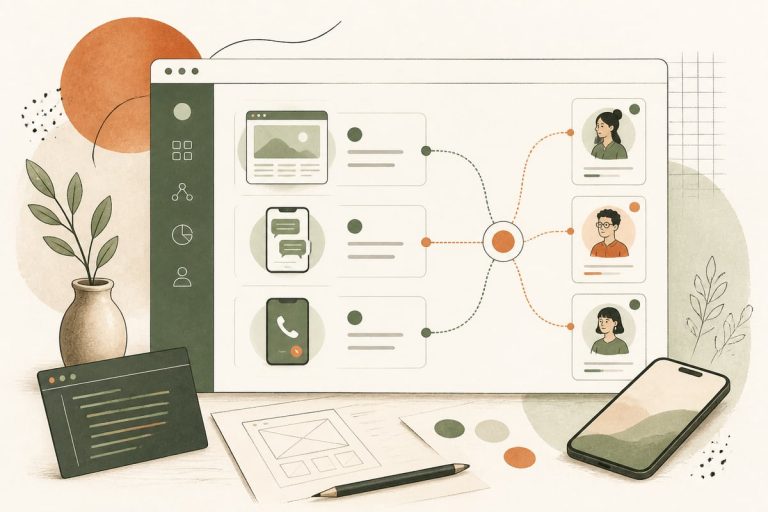
Should You Use AI to Route and Prioritize New Leads Automatically? A Small-Business Guide to Faster Response and Better Close Rates
If your business gets leads from forms, calls, chat, text, or email, AI can help you sort and assign them faster so the right person follows up first. For many small businesses, that means less admin work, fewer missed opportunities, and more revenue from leads you are already paying to generate.
What AI lead routing actually does
AI lead routing is not just a chatbot and it is not magic. It is a workflow that looks at new inquiries, pulls out useful details, and sends each lead to the best next step.
That might include:
- sending a roofing repair lead to one estimator and a full replacement lead to another
- flagging a legal matter as urgent based on keywords in the intake message
- separating existing-customer support requests from brand-new sales inquiries
- sending Spanish-speaking leads to the right team member
- routing high-value commercial jobs ahead of smaller one-off requests
- pushing spam or junk leads into a review queue instead of your main inbox
For a small business, this matters because speed alone is not enough. A fast response from the wrong person, with the wrong message, still costs you deals.
Signs your current lead handling is costing you customers
Many businesses think they have a traffic problem when they really have a routing problem.
You may need better lead routing if:
- all inquiries go to one general email inbox
- office staff manually forwards leads to the right person
- salespeople cherry-pick the easiest leads and ignore the rest
- urgent requests sit too long because nobody realizes they are urgent
- your form asks for useful details, but nobody uses them consistently
- leads from chat, phone, and forms all follow different processes
- after-hours inquiries wait until morning even when they are ready to book now
- you cannot easily tell which leads are new prospects versus current clients
This is common in clinics, law firms, contractors, home-service companies, and nonprofits with small teams. When everyone is busy, lead handling becomes reactive. AI can make it more consistent.
Where AI routing helps most
Not every business needs a complex setup. But AI routing is especially useful when you have:
Multiple services
If your business offers several distinct services, AI can identify intent and send the lead to the right specialist.
Examples:
- a med spa separating Botox, laser, and consultation requests
- a law firm routing family law, personal injury, and estate planning inquiries differently
- a contractor separating emergency repairs from planned remodels
Multiple locations or territories
If you serve different cities or zip codes, AI can assign the lead based on service area.
This helps avoid the classic problem where a great lead sits because no one is sure who owns that territory.
Different lead quality levels
Some inquiries are ready to move now. Others are early research. AI can score or tag those differences based on what the person says, what service they want, and how they came in.
That does not mean ignoring lower-intent leads. It means handling them differently.
A mix of communication channels
If leads come in through web forms, chat, phone transcripts, text messages, and email, AI can normalize that information into one workflow instead of five separate mini-systems.
What a good AI routing workflow looks like
The best systems are usually simple. They do a few things reliably instead of trying to replace your whole team.
A practical workflow often looks like this:
- A new lead comes in from your website, phone system, chat, text, or email.
- AI extracts key details such as service needed, urgency, location, language, budget signals, and customer type.
- The lead is tagged or scored.
- The system assigns it to the right person, inbox, pipeline stage, or office.
- An automatic reply goes out with the appropriate next step.
- If no one follows up in time, the system escalates or reassigns it.
That last step is important. Routing alone is not enough if nobody acts.
What small-business owners should decide before automating anything
Before you build an AI workflow, get clear on your rules. Otherwise you will automate confusion.
Use this checklist:
- Which lead sources should feed into one system?
- What services need different handling?
- Which inquiries count as urgent?
- Who owns which territories or service categories?
- What should happen after hours?
- Which languages need dedicated routing?
- What counts as spam or low-fit?
- How long should each lead wait before escalation?
- What should the first auto-response say for each type of lead?
If you cannot answer these questions yet, that is okay. It usually means your process needs cleanup before automation.
The trade-offs to know before you implement AI routing
AI routing can be a great upgrade, but it is not risk-free.
It is only as good as your intake inputs
If your form is vague, your call transcripts are poor, or your team uses inconsistent notes, AI will have less to work with.
Over-automation can frustrate buyers
If every lead gets forced through too many steps before reaching a human, you may improve efficiency while hurting conversions.
Edge cases will happen
Some inquiries do not fit neat categories. Your workflow needs a fallback path for unusual requests.
You still need human oversight
Someone should review how leads are being classified and routed, especially during the first few weeks.
The goal is not to remove people from the process. The goal is to make sure your people spend time where it matters most.
How to start without making a big expensive mess
You do not need to automate everything at once. In fact, that is usually the wrong move.
Start with one high-friction use case.
Good starting points include:
- separating new leads from existing customer support messages
- routing by service type
- routing by location or zip code
- prioritizing urgent inquiries
- assigning after-hours leads to an AI assistant or next-morning priority queue
Then measure basic operational outcomes such as:
- response time by lead type
- percentage of leads assigned correctly
- how many leads need manual reassignment
- how many leads get no follow-up within your target window
- booked appointments or consultations by source and route
You do not need fake vanity metrics. You need to know whether good leads are getting to the right person faster.
Tools are not the strategy
Many business owners start by asking which AI app to buy. That is backwards.
The real order is:
- map the lead flow
- define routing rules
- decide what should be automatic and what should stay human
- connect the right tools
Depending on your setup, that may involve:
- your website forms
- CRM or pipeline software
- phone system transcripts
- chat or SMS tools
- calendar or scheduling tools
- internal notifications in email, Slack, or a dashboard
For some businesses, WordPress can be the front-end entry point while the routing happens in a CRM or custom automation layer. For others, a custom workflow across website, phone, and admin tools makes more sense.
Who should probably do this now
AI lead routing is worth considering now if:
- you are already spending money on SEO, ads, referrals, or outbound marketing
- you have enough lead volume that manual sorting slows down follow-up
- your team handles multiple services, locations, or lead types
- you suspect leads are being missed, delayed, or mishandled
- you want better operational consistency without hiring more admin staff first
If you get only a few straightforward leads per week, keep it simple. But if your pipeline is active and messy, smarter routing can produce ROI from demand you already have.
A simple example of the ROI logic
Here is the plain-business version.
If your website and marketing are already generating inquiries, every delay, bad handoff, or misrouted lead reduces the value of that traffic. Better routing does not create demand by itself, but it helps you capture more of the demand you already earned.
That is why this type of automation often makes sense before spending more on ads or redesigning everything. If the handoff is broken, more leads just means more waste.
The best next step
If you are curious about AI routing, do not begin with a giant software rollout. Start by auditing what happens to a lead from the moment it comes in to the moment someone actually follows up.
Look for bottlenecks, delays, duplicate work, and moments where your team has to guess what should happen next. Those are usually the best automation opportunities.
At Webmaster & More, we build practical AI workflows for small businesses, including website-connected automations, AI chat and phone systems, lead routing, and follow-up processes that fit the way your team actually works.
Frequently asked questions
Is AI lead routing only for large companies?
No. Small businesses often benefit the most because they have less admin capacity and more to lose when a good lead gets missed or delayed.
Can AI route phone calls and website leads together?
Yes. If your phone system provides transcripts or structured call data, those calls can be routed alongside form, chat, email, and text inquiries.
Will AI replace my front desk or sales team?
Usually no. The better use case is helping your team respond faster, with better information and less manual sorting.
How long does it take to set up?
That depends on how messy your current process is and how many systems need to connect. A simple routing workflow can be much faster to launch than a full operational overhaul.
What if we already have a CRM?
That is often a good starting point. AI routing can sometimes be layered into your existing CRM, forms, phone tools, and scheduling process rather than replacing them.
If you want help figuring out whether AI lead routing makes sense for your business, book a free consultation: https://webmasterandmore.com/consultation