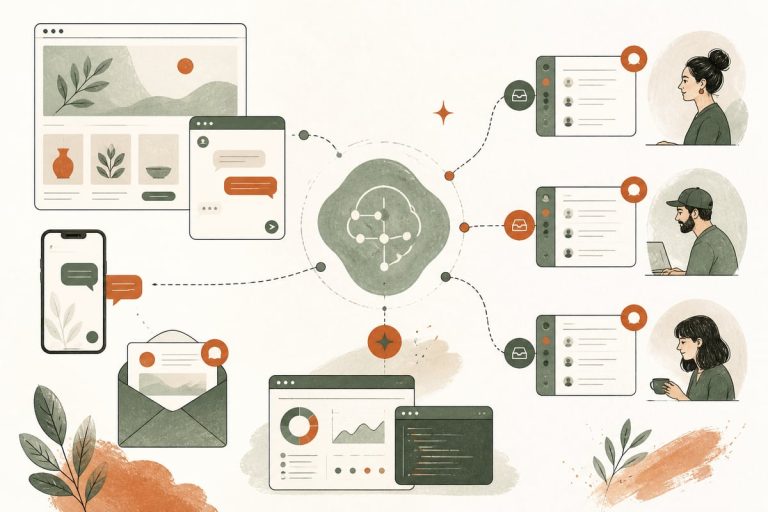
Should You Use AI to Handle New Lead Intake Across Text, Email, and Web Chat? A Small-Business Guide to Faster Replies and Fewer Lost Leads
If leads are coming in through multiple channels, AI can help you reply faster, gather key details, and route each inquiry to the right person. The best setup does not replace your team; it reduces response delays, prevents missed inquiries, and makes it easier for prospects to become customers.
Why this matters for small businesses
A lot of small businesses do not have a lead problem. They have a follow-up problem.
Someone fills out a form at 9:20 PM. Another person sends a text during lunch. A third replies to an old email thread asking for help now. If those messages land in different places and no one owns the intake process, good opportunities go cold fast.
That is where an AI-assisted intake workflow can help. Instead of relying on staff to manually watch every inbox and respond the same way every time, AI can:
- send an immediate first reply
- ask a few useful qualifying questions
- collect contact details in a structured format
- route the lead to the right team member
- trigger booking, quoting, or follow-up steps
- flag urgent or high-value inquiries
For a clinic, that may mean separating new patient inquiries from billing questions. For a law firm, it may mean screening practice area and urgency. For a contractor, it may mean figuring out project type, location, and timeline before the estimator calls back.
What “AI lead intake” actually means
This is not just a chatbot pasted onto your website.
A practical AI intake system usually connects several channels and actions together:
- website contact forms
- website chat or AI chat assistant
- SMS/text inquiries
- email inquiries
- CRM or customer database
- calendar or booking tool
- internal notifications for your staff
The AI layer can read what someone sent, respond in a brand-appropriate way, ask the next best question, and move the lead into a workflow.
For example:
- A prospect submits a form asking about services.
- AI sends an immediate reply by email or text.
- It asks 2 to 4 useful intake questions.
- Based on the answers, it tags the lead.
- The lead gets routed to the right person or invited to book.
- Your team sees a cleaner, more complete inquiry instead of a vague message.
That is very different from generic auto-replies like, “Thanks, we got your message.”
When this is a smart move
AI intake is usually worth considering if any of these sound familiar:
- leads come in after hours
- your team is slow to reply because they are busy doing the work
- inquiries arrive through too many channels
- staff ask the same intake questions over and over
- good leads are mixed in with spam, wrong-fit, or low-priority inquiries
- you want faster follow-up without hiring another admin person right away
It is especially useful for service businesses where speed matters but every lead still needs some filtering.
What questions AI should ask first
The best intake questions are short, practical, and tied to what happens next.
Here are common examples:
- What service are you looking for?
- Are you a new or existing customer?
- What city or service area are you in?
- How soon do you need help?
- What is the best phone number or email to reach you?
- What is the main issue you need help with?
Depending on the business, you might also ask:
- preferred appointment times
- budget range
- property type
- case type
- insurance status
- language preference
The key is not to overdo it. If the AI asks too many questions up front, people drop off. Usually, 2 to 5 good questions are enough before handing off, booking, or following up.
What a good workflow looks like
A strong AI intake workflow should feel simple to the customer and organized behind the scenes.
Example workflow for a local service business
- Visitor starts with website chat, form, or text
- AI replies within seconds
- AI asks service type, zip code, urgency, and contact method
- If it is a good-fit lead in the service area, AI offers booking or says a team member will call shortly
- If it is after hours, AI sets expectations and captures everything for morning follow-up
- Staff receives a clean summary in email, CRM, or Slack
- If no booking happens, an automated reminder goes out later
Example workflow for a law firm or clinic
- AI greets the lead and explains it is an intake assistant
- It asks for practice area or appointment type
- It screens for urgency and basic eligibility
- It avoids giving legal or medical advice
- It routes emergency, sensitive, or complex cases to human staff immediately
- It logs the conversation and creates a structured intake record
This is where setup matters. The AI should support your business process, not create a second process your team has to clean up.
Benefits you can realistically expect
If implemented well, AI intake can improve operations in a few important ways.
1. Faster first response
This is the most obvious win. Even if your staff cannot respond right away, the lead gets a quick, helpful acknowledgment and next step.
2. Better lead quality before handoff
Instead of calling someone with no context, your team already knows what they need, where they are, and how urgent the situation is.
3. Fewer missed leads
Messages that used to sit in inboxes, get buried in texts, or arrive after hours are less likely to be forgotten.
4. Less repetitive admin work
Your staff spends less time asking the same intake questions and more time closing business or serving customers.
5. Better reporting and routing
When inquiries get captured in a structured way, you can actually see what is coming in, where bottlenecks are, and which channels are producing good leads.
Trade-offs and common mistakes
AI intake is helpful, but it is not magic.
Here are the main trade-offs to think about.
Too much automation can feel cold
If every message sounds robotic or over-scripted, trust can drop. Small businesses still win by feeling responsive and human.
Bad prompts create bad intake
If the system is not trained on your services, service area, policies, and routing rules, it can ask the wrong questions or confuse prospects.
Not every lead should stay with AI
Some conversations need a person quickly. Billing disputes, emergencies, sensitive legal matters, and frustrated repeat callers should usually be escalated fast.
Channel overload can create duplicate conversations
If someone fills out a form, texts, and emails, your workflow needs deduplication and clean logging. Otherwise, your team gets chaos, not efficiency.
Compliance matters
For clinics, law firms, and other regulated businesses, you need to think about privacy, consent, and what information should or should not be collected.
How to decide if your business is ready
Use this quick checklist.
You are probably a good fit if:
- you get steady lead volume each week
- response delays are costing you opportunities
- your team repeats the same intake steps often
- you already know what questions qualify a good lead
- you have a clear next step like booking, callback, estimate, or consultation
You may not be ready yet if:
- your sales process is still unclear
- your service offerings are confusing internally
- nobody on your team owns lead follow-up
- you have very low inquiry volume
- your main problem is weak traffic, not slow intake
AI works best when the underlying process is already understandable.
How to implement it without making a mess
Start small.
A good rollout usually looks like this:
- Map your current lead sources: form, chat, text, email, calls.
- Identify the top 3 to 5 questions your team asks every new lead.
- Define routing rules by service, urgency, and location.
- Decide when AI should hand off to a person.
- Connect the workflow to your CRM, inbox, or internal notifications.
- Review transcripts regularly and improve the prompts.
Do not try to automate every edge case on day one. It is usually smarter to automate the most common inquiries first, then expand.
The ROI question small-business owners actually care about
The real value is not “using AI.” It is reducing the gap between interest and action.
If your business loses leads because replies are slow, intake is inconsistent, or messages fall through the cracks, AI can tighten that system. That can mean:
- more conversations started
- better-qualified calls
- fewer missed after-hours inquiries
- less staff time spent on repetitive admin
But the return depends on execution. A simple, well-routed workflow usually outperforms a flashy AI tool that is not connected to your actual sales process.
Bottom line
If your leads arrive through text, email, forms, and chat, AI can help you create one cleaner intake process instead of four messy ones. The goal is not to sound futuristic. The goal is to respond faster, qualify better, and make it easier for the right prospects to become customers.
If you want help planning or building an AI intake workflow for your website and business tools, you can book a free consultation at https://webmasterandmore.com/consultation.
Frequently asked questions
Can AI handle lead intake without replacing my front desk or office staff?
Yes. In most small businesses, AI works best as a first-response and intake layer, not a full replacement. It reduces repetitive work and helps your team focus on higher-value conversations.
What is the difference between an AI chatbot and AI lead intake?
A chatbot may just answer questions on the website. AI lead intake usually includes qualification, routing, follow-up, and integration with tools like CRM, email, SMS, and booking systems.
Will customers get annoyed if AI responds first?
Usually not, if the response is fast, clear, and useful. Problems happen when the system feels generic, asks too many questions, or blocks access to a human.
Can AI intake work for businesses that get leads by phone too?
Yes. It can complement phone workflows by capturing web, text, and email inquiries in the same system, and it can also connect with AI phone reception or missed-call follow-up tools.
How long does it take to set up an AI intake workflow?
It depends on the channels, rules, and integrations involved. A simple setup can move quickly, while a more advanced workflow with CRM, SMS, booking, and multi-step routing takes more planning. A free consultation can help scope the right version first.